Learn AutoCAD with our Free Tutorials
Welcome to CADTutor
CADTutor provides the best free tutorials and articles for AutoCAD, 3ds Max and associated applications along with a friendly community forum. If you need to learn AutoCAD, or you want to be more productive, you're in the right place. See our tip of the day to start learning right now!
Free Tutorials and More…
The Tutorials section provides over 100 original tutorials for AutoCAD, 3ds Max and other design applications. Michael’s Corner is an archive of productivity articles that brings you the best AutoCAD tips and tricks. Our Forum is a lively community where AutoCAD users can ask questions and get answers. The Downloads area provides free AutoCAD blocks, free AutoLISP routines and free images.
Tutorials of the Moment
Recently viewed tutorials
-
ISO Paper Sizes

There has alwas been some confusion over the size of standard ISO drawing sheets with AutoCAD.The stated sizes in the plot dialogue box are not the true ISO sizes. This tutorial explains why and how to plot to scale from Model Space. Format: Text/Image
Last visited: less than one minute ago
-
Animation

Design visualisation animation generally involves animation of cameras in walkthrough, panaround or flyover movies to give the client a much richer and more informative view of the design. This tutorial covers the basics. Format: Text/Image
Last visited: less than one minute ago
-
Paper Space Exercise

AutoCAD's paper space mode is a bit like having a page in a scrapbook onto which you can paste different views of your AutoCAD drawing. This whole page can then be plotted. This exercise demonstrates how. Format: Text/Image
Last visited: 1 minute ago
-
Keyframe Animation

This tutorial gives a basic but comprehensive introduction to keyframe animation in Bryce and introduces some key concepts in animation generally. Format: Text/Image
Last visited: 4 minutes ago
-
All About Images

This tutorial tells you all you need to know about working with images in AutoCAD. Format: Text/Image
Last visited: 13 minutes ago
-
Entering Survey Data using AutoCAD

These techniques apply to basic CAD programs such as AutoCAD, IntelliCAD, etc. If you have a civil/survey program or add-on, such as Land Desktop, SurvCADD, Eagle Point, etc., then there are built-in tools for entering lines and curves. Format: Text/Image
Last visited: 14 minutes ago
CADTutor Tutorials
Our tutorials are comprehensive but straightforward introductions to AutoCAD and related software. They are designed to help beginners get to grips with design workflows as quickly as possible. There are over 100 to choose from, some text/image based and others in video format. Whatever stage you are at in your learning, you should find a tutorial to help.
Forum Latest
Currently Active Topics
A Need for Info on Getting Started: Plotting in Batch from the Model Tab
by Clint
23 replies
Last post: 54 minutes ago
Export Layers into individual Files
by ktbjx
6 replies
Last post: 8 hours ago
Join endpoints of multiple polylines to common point
by Jozef13
12 replies
Last post: 8 hours ago
Can anyone help me? get the attribute value based on the block name
by Kvlar
23 replies
Last post: 10 hours ago
Can't copy/output results from a FIND list
by mjf1999
6 replies
Last post: 15 hours ago
REBAR QUANTITIES AND LENGTH CALCULATIONS WITH TABLE TO EXCEL
by achila
4 replies
Last post: 20 hours ago
This Week's Hot Topics
Can anyone help me? get the attribute value based on the block name
by Kvlar
23 replies
Viewed: 371 times
Why would entlast not be getting the unioned entity in this code?
by sambar37
18 replies
Viewed: 658 times
Changing All Block Attribute values together like a normal block
by Hsanon
17 replies
Viewed: 573 times
Remove a section of text in a text file from between 2 keywords with autolisp or visual lisp
by Mr Bojangles
16 replies
Viewed: 462 times
Can't join 3D polylines (I've tried every suggestion I could find)
by 0misclose
7 replies
Viewed: 180 times
Export Layers into individual Files
by ktbjx
6 replies
Viewed: 232 times
CADTutor Forums
Our forum is a vibrant community of experts and beginners. The main focus is helping beginners get to grips with AutoCAD and to help more advanced users become more productive. The AutoLISP forum is one of the busiest out there, providing expert advice for busy professionals.
AutoCAD Productivity
Layer Previous
From: AutoCAD Productivity Articles #132
Originally published: February 2014
 Layers are the lifeblood in AutoCAD, and efficient management thereof is the key to your own quality of life; specifically, your sanity.
The Layer Previous button can be a real time saver and is, at its core, a Layer-specific ‘Undo’.
How to Use Layer Previous
Open a drawing, then make a new layer [MC_FEB2014], give it a color and make it current; this will be our testing layer.
Change the Color of any other layer in the current drawing, but don't make that layer current.
On our test layer, draw a small rectangle somewhere.
Click Layer Previous and the rectangle remains, but the color of the layer you changed is restored.
Freeze several existing layers, then Rotate the rectangle.
Click Layer Previous and the previously frozen layers are thawed… but the rectangle is still rotated!
See all the articles published in February 2014
Michael's Corner
Between 2003 and 2016, Michael Beall (and one or two guests) wrote almost 600 articles for CADTutor. The focus of these articles is AutoCAD productivity, and although some of them are now more than a few years old, most remain relevant to current versions of AutoCAD. The article above is just one example. Check out Michael's Corner for a full listing.
Image of the Week
-
13th – 19th May 2024
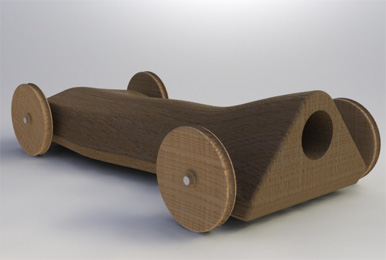
This week's image is by shift1313
Software used: Solidworks 2009
-
Last Week's Image
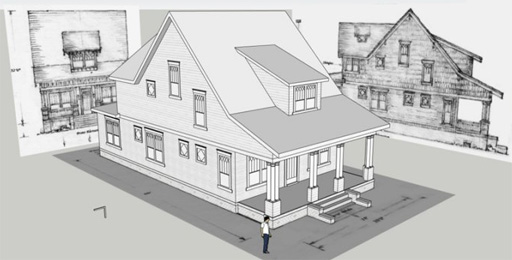
Last week's image is by f700es
Software used: SketchUp
-
Two Weeks Ago

This image is by Frontop
Software used: AutoCAD Architecture 2010
-
Three Weeks Ago

This image is by kayaan
Software used: AutoCAD 2010
Gallery of Work
Over the years, our forum members have contributed hundreds of images, showcasing their amazing work. The images above are just a small selection that demonstrate the wide range of project types our community is involved with. Take a look at our gallery to see all the images published in the last 12 months.
Tip of the Day
AutoCAD 2007 - Where's my old XREF Manager?
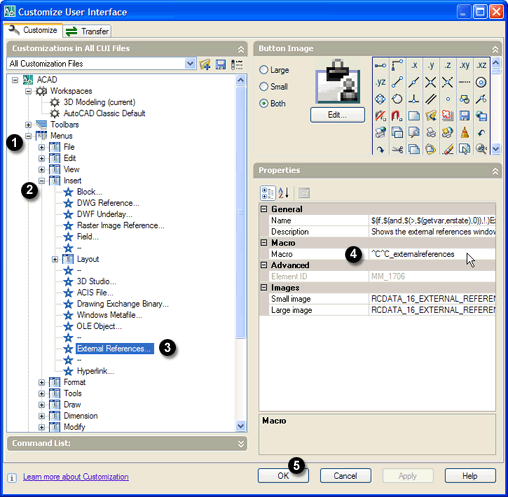 A lot of people using AutoCAD 2007 and above don't like the new XREF Manager, so here's a simple way to get the old one back.
AutoCAD 2007 introduced a new way to manage XREFs and to bring up the "old" XREF Manager, you have to type CLASSICXREF at the command line. Well, if you want things back the way they were and use the classic XREF Manager as the default from the keyboard and from the menu, a few adjustments will get you there…
First, go to . This command opens the ACAD.PGP file in Notepad. This is where all the keyboard shortcuts are defined.
Next, scroll down until you see XR (or use ), change the value from *XREF to *CLASSICXREF and save (). Close Notepad and return to AutoCAD. Enter the command REINIT, check the "PGP File" checkbox and click "OK". That fixes the keyboard so that next time you type XR, you'll see the old manager and not the new one.
To change your Menu, type CUI at the command line. In the "Customizations in All CUI Files" pane of the "Custom User Interface" dialogue, go to and click on it once to highlight it.
Now, in the "Properties" pane, change the "Macro" setting from ^C^C_externalreferences to ^C^C_classicxref, click "OK" to save the changes and you're done.
Missed a Tip?
Did you miss yesterday's tip? Maybe you forgot to drop by or maybe you don't visit over the weekend. If so, you can now see all the tips published during the past week. Also, if you have a tip you'd like to share with us, you can post it on our forum and if we like it, we'll publish it here.